
Enhanced Dictionary Tool with Secure History Tracking
Overview
The software is a browser extension designed to enhance dictionary functionality across multiple platforms, offering users a streamlined way to look up words, manage query history, and access pronunciation features. It addresses common issues found in standard dictionary tools, such as unreliable settings persistence and unwanted redirects to search engines. The tool is particularly useful for students, language learners, and professionals who frequently reference vocabulary while browsing online content.
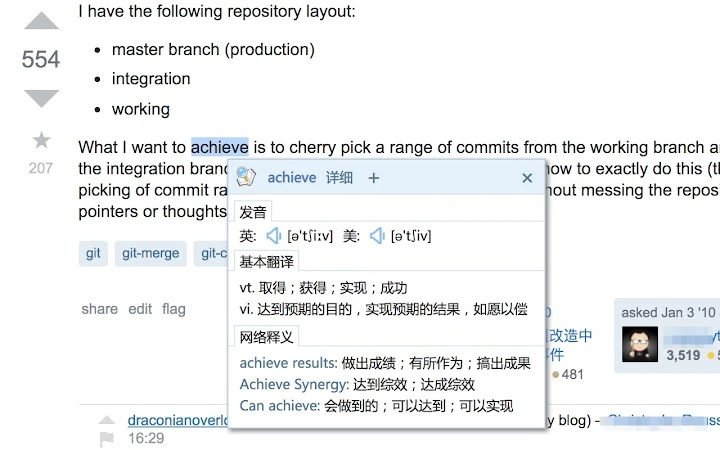
By integrating directly into web pages, it enables quick word lookups without leaving the current context. The extension supports HTTPS pages, ensuring secure operation even on encrypted websites. It also avoids interference with the original page’s styling through the use of ShadowDOM technology, maintaining a clean and consistent user experience. Real-world usage includes academic research, content creation, and language study, where accurate and efficient word definitions are essential.
While the developer’s background is not publicly available, the extension’s evolution reflects a strong focus on user feedback and technical refinement. Regular updates since 2015 demonstrate a commitment to improving functionality and compatibility. The tool operates as a standalone utility within the browser environment, requiring no external installation beyond the extension itself.
Key Features & Capabilities
- Query History Management – Records and allows users to export past word searches, enabling review and reference for study or documentation purposes.
- Automatic Text-to-Speech Control – Supports voice playback on HTTPS pages, ensuring accessibility for visually impaired users and aiding language learners in pronunciation practice.
- Removal of Redirection Backdoor – Addresses a known issue in the official version that redirected users to Baidu’s homepage, enhancing security and user trust.
- Settings Persistence Fix – Resolves a long-standing bug where user preferences were not saved across sessions, improving usability and reliability.
- ShadowDOM Integration – Uses modern web technology to isolate the extension’s interface from the host page’s styles, preventing visual conflicts and layout disruptions.
- Wordbook Integration – Allows users to save frequently encountered words to a personal vocabulary list, with support for synchronization via Google account.
- Custom Trigger Keys – Enables users to define specific keyboard shortcuts (Shift, Alt, Ctrl, Option, Command) to activate the lookup function, increasing workflow efficiency.
- Enhanced Pronunciation Controls – Includes both American and British accent options, improving accuracy and user preference flexibility.
These features collectively support efficient language learning, research, and content creation. For example, a student can quickly define a term while reading an article, save it to their wordbook, and later review the history of all terms studied. A writer can use custom triggers to look up unfamiliar words without interrupting their flow.
User Interface, Workflow & Performance
The user interface is designed to be minimal and unobtrusive, appearing only when a word is selected. It integrates seamlessly into the browser environment, avoiding clutter and maintaining focus on the content being viewed. Navigation is straightforward, with options accessible via context menus or keyboard shortcuts.
Workflow efficiency is enhanced by the ability to trigger lookups with predefined keys, reducing the need for mouse interaction. The extension responds quickly to user input, though exact performance metrics were not specified. The developer did not provide detailed information on CPU or RAM usage, but the 2.5 MB file size suggests a lightweight footprint.
Stability appears to have improved over time, particularly after fixes to settings persistence and event binding. The use of ES6 and modern JavaScript practices indicates a commitment to code quality. No reported crashes or bugs were mentioned in the release notes, suggesting reliable operation under normal conditions.
Compatibility & System Requirements
The software is compatible with Windows, Mac, and Linux operating systems, making it accessible to a broad user base. It functions as a browser extension, primarily designed for Chrome and Google-based environments, though it may support other Chromium-based browsers.
The installation size is 2.5 MB, indicating a compact footprint that minimizes disk space usage. The software version is 3.3.2, released on July 9, 2019. Exact system requirements were not listed, and the developer did not provide details on hardware specifications such as RAM or processor speed.
Platform compatibility information is limited to the supported OS types. Users should ensure their browser is up to date to maintain optimal functionality. No specific dependencies were mentioned in the release notes.
Pros and Cons
Pros
- Lightweight at just 2.5 MB
- Supports HTTPS pages for secure browsing
- Removes known redirect backdoor from official version
- Offers persistent settings and history tracking
- Uses ShadowDOM to prevent UI conflicts
- Customizable trigger keys for faster access
- Integrates with Google account for sync
- Free to download and use
Cons
- No official developer information available
- Performance resource usage not disclosed
- Latest update released in 2019, may lack recent improvements
- Limited to browser-based functionality
- No offline mode mentioned
- Only supports Google account sync, not other providers
FAQ Section
Is this software compatible with all browsers?
The extension is designed for Chrome and other Chromium-based browsers. Compatibility with non-Chromium browsers is not confirmed.
Is the software safe to install?
Yes, the extension has been updated to remove a known redirect backdoor. It does not access or store personal login credentials.
Can I use this tool offline?
The software requires an active internet connection to fetch definitions and pronunciation data. No offline functionality was mentioned in the documentation.
How are my settings saved?
User preferences are synchronized with a Google account, ensuring they remain consistent across devices.
Is this tool free to use?
Yes, the software is available at no cost. There are no hidden fees or subscription models.
Final Thoughts + CTA
This dictionary extension stands out for its focus on security, usability, and user-driven improvements. By eliminating a known redirect vulnerability and fixing persistent settings, it offers a trustworthy alternative to the official version. Its lightweight design and cross-platform support make it ideal for students, researchers, and language enthusiasts who rely on quick, accurate word lookup.
While the last update was in 2019, the core functionality remains robust and relevant. For users seeking a reliable, secure, and efficient dictionary tool that integrates smoothly into their browsing experience, this software delivers consistent value.
Download Enhanced Dictionary Tool now







